
Servers help websites, apps, and online services run each day. Many companies use servers to store files, manage data, and keep their systems working. But servers can face problems. A fan may stop working. A power supply may fail. The system may also become too hot. These issues can cause a server to shut down.
Platform Event Trap helps IT teams learn about these problems before they become worse. It sends alerts when server hardware reports an important event. This helps workers check the system and take action. In this guide, you will learn what Platform Event Trap means, how it works, and why it matters for server health.
What Is Platform Event Trap?
Platform Event Trap, also called PET, is a way to send alerts about server hardware events. It helps IT teams find problems with parts such as fans, memory, and power supplies. PET uses a set message format so a monitoring system can read the alert. It often works with a technology called IPMI, which stands for Intelligent Platform Management Interface.
A Platform Event Trap does not fix hardware on its own. It sends information about an event that needs attention. For example, a server may find that its cooling fan has stopped. The server’s management system can send a PET alert to a monitoring tool. An IT worker can then check the problem. This makes it easier to find faults without watching every server all day.
Why Is Platform Event Trap Important?
A server can have many parts working at the same time. Each part plays a role in keeping the system safe and ready. When one part fails, other parts may face more stress. For example, a broken fan may cause the server to become too hot. This can harm its parts or force it to shut down.
Platform Event Trap helps reduce the time between a hardware fault and a warning. It tells the monitoring system that something needs attention. The IT team can then find the affected server and check the issue. Early notice may help prevent a small problem from growing into a major failure. It can also help a business avoid long periods of service loss.
How Does Platform Event Trap Work?
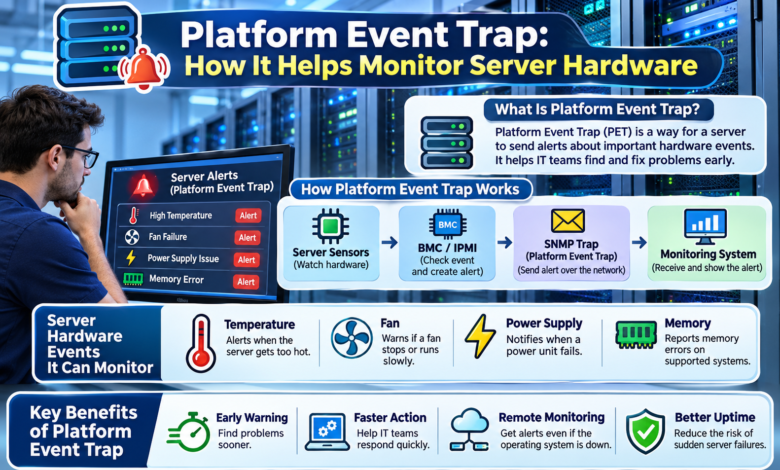
Platform Event Trap works through a few connected parts. First, hardware sensors watch the server. These sensors may check heat, fan speed, power, and other conditions. When a sensor finds a problem, the server management system gets an event message.
Next, the management controller checks whether the event needs an alert. If the event matches an active rule, the system can create a Platform Event Trap message. It then sends that message through the network to a set address. A monitoring tool receives the message and shows the details.
For example, a fan may stop turning. The server detects the change and sends an alert. The IT team sees the warning and can inspect the fan. This process helps workers act without waiting for the whole server to fail.
The Role of the Baseboard Management Controller
The Baseboard Management Controller, or BMC, plays a key role in many server systems. It is a small controller that helps manage server hardware. It can check sensors, save event records, and support remote management.
The BMC also helps send Platform Event Trap messages. One useful feature is that it can work apart from the main operating system. This means a server may still send hardware alerts even when its operating system has stopped working.
The BMC needs the right power, network access, and alert settings to do this. A damaged network link or wrong setup can stop the alert from reaching its target. For this reason, IT teams must check both the server hardware and its management connection.
What Hardware Problems Can Platform Event Trap Detect?
Platform Event Trap can report different kinds of server hardware events. The exact alerts depend on the server model, its sensors, and its settings.
Temperature Problems
Servers produce heat while they work. Cooling fans help keep that heat under control. If a sensor finds that the temperature has crossed a set limit, the server may send an alert. Workers can then check airflow, fans, and room cooling.
Fan Failures
Fans help move hot air away from server parts. A failed fan may cause the system to overheat. A PET alert can warn the IT team when a supported fan sensor reports a fault or a speed problem.
Power Supply Problems
A power supply gives the server the power it needs. If one power supply fails, the server may face a risk of shutdown. Some servers have spare power supplies that help them stay online. PET can report a power fault so workers can check the failed unit.
Memory and Other Hardware Errors
Some servers also report memory faults, startup errors, and other system events. These warnings help workers find parts that may need testing or repair. Not every server supports the same set of alerts.
How Platform Event Trap Uses SNMP
SNMP stands for Simple Network Management Protocol. It helps network and server tools share management information. Platform Event Trap uses a special SNMP Trap message to report hardware events.
An SNMP Trap is a message that a device sends without waiting for the monitoring tool to ask for it. This makes it useful when an urgent event takes place. The message may include the event type, sensor details, and information about the server.
Many older PET systems use SNMP version 1. Some newer server tools support other SNMP versions for their alerts. The available choices depend on the hardware and its software. IT teams should check the server guide before setting up alerts.
Platform Event Trap vs Platform Event Filtering
Platform Event Trap and Platform Event Filtering work together, but they have different jobs. Platform Event Filtering, or PEF, helps the server decide which events need action. It checks the event against rules that the IT team has set.
Platform Event Trap is the message format used to send an alert about that event. For example, a server may have a rule that watches for a failed fan. PEF checks the event and allows an alert. PET carries the warning to the monitoring system.
This difference is important. PEF helps decide when an alert should happen. PET helps send the alert details. Together, they make server hardware warnings more useful.
Key Benefits of Platform Event Trap
One major benefit of Platform Event Trap is early warning. It helps IT teams learn about hardware problems without checking each server by hand. This is useful for businesses that run many servers in one place.
PET can also help teams work faster. When a monitoring tool receives an alert, it may show which server needs care. Workers can check the affected part and plan the next step. This can reduce the time spent finding the problem.
Another benefit is remote hardware monitoring. Some alerts can reach workers even when the server’s operating system is not running. This is helpful when a system has crashed. PET also gives IT teams event records they can review to find repeat problems.
A Real-Life Example of Platform Event Trap
Think about a company that runs an online store. Its servers help customers view products, place orders, and make payments. One day, a cooling fan in a server stops working. The server can still run, but its temperature may start to rise.
A hardware sensor reports the fan fault. The management controller checks the alert rules and sends a Platform Event Trap message. The monitoring system receives the warning and shows the event to the IT team.
A worker checks the server and finds the failed fan. The team can plan a repair before heat causes more damage. PET does not promise that the store will stay online. But it gives the team an earlier chance to act.
How to Set Up Platform Event Trap
Setting up Platform Event Trap depends on the server brand and model. Many servers offer alert settings through a BMC management page. Some systems also support command tools for this work.
First, the IT worker opens the server management settings. The worker checks that hardware monitoring and alert features are available. Next, the worker turns on the needed event filters and chooses which faults should send warnings.
The team then adds the network address of the monitoring system that will receive the alerts. It must also set the right SNMP options and alert policy. After saving the settings, the worker should send a test alert if the server supports this feature.
The last step is to check that the monitoring tool received the test message. If the test fails, the team should review the network and alert settings. This helps make sure the warning system works when a real fault happens.
How to Read a Platform Event Trap Alert
A Platform Event Trap alert may contain several technical fields. These fields help the monitoring tool explain what happened. The message may identify the source system, the sensor, and the type of event.
For example, a warning may point to a temperature sensor and show that a heat limit was crossed. A monitoring tool can turn this data into a clear message for the IT team. Some tools also show the alert level and the time they received it.
Workers should not judge a server from one alert alone. They should check sensor readings, event logs, and the server’s current health. This helps them tell a short warning apart from a real hardware fault.
Common Platform Event Trap Problems
Platform Event Trap can fail to send useful warnings if the settings are wrong. One common issue is a missing alert destination. The server may detect a hardware event but have no correct address for the warning.
Another problem is a network block. A firewall or network rule may stop the trap from reaching the monitoring system. Some teams also forget to turn on the right event filters.
A monitoring tool may receive the alert but fail to show its meaning. This can happen when the tool lacks the right event details or device information.
The best way to find these problems is to test the full alert path. Check the server settings, network connection, and monitoring tool. Then send a test alert and review the result.
Best Practices for Server Hardware Monitoring
Platform Event Trap works best as part of a full server care plan. IT teams should review alert settings and make sure the right people receive important warnings. They should also test alerts after changing network or server settings.
Teams should keep the server’s management software up to date. They should protect management access with strong passwords and use a separate management network when possible. Older SNMP alert methods may not protect data with encryption.
It is also wise to keep server logs and check repeat faults. A fan that fails more than once may need more than a quick restart. Regular checks help workers find the cause and choose a lasting fix.
Limitations of Platform Event Trap
Platform Event Trap is useful, but it has limits. It does not repair broken parts or stop every failure. It also does not give a full, live view of every hardware value. Its main job is to report events that the server detects and chooses to send.
Some SNMP Trap messages can get lost on the network. IPMI offers alert receipt and retry features in certain setups, but support can vary. PET also depends on working sensors, the management controller, and the alert path.
For these reasons, IT teams should use PET with system logs, sensor checks, backups, and other monitoring tools. This gives them a better view of server health.
Is Platform Event Trap Still Useful in 2026?
Platform Event Trap still matters in 2026 for servers and management systems that support it. Many companies use newer tools that offer web pages, remote control, email alerts, and other ways to report hardware events.
Some newer management systems use different alert methods. This means PET is not the only way to track server faults. Its value depends on the hardware and the tools a company uses.
For a team with older IPMI-based servers, PET may still be a helpful part of daily monitoring. For newer servers, workers should check the maker’s current guide and choose supported alert features.
Final Thoughts
Platform Event Trap helps IT teams receive important warnings about server hardware. It can report events linked to heat, fans, power supplies, and other parts. This makes it easier to find faults and take action before they cause more trouble.
The main value of Platform Event Trap is clear and timely notice. It works with server management tools to share hardware event details. While PET cannot prevent every problem, it can help teams respond faster. When used with good security, regular checks, and other monitoring tools, it can support safer and more reliable server work.