

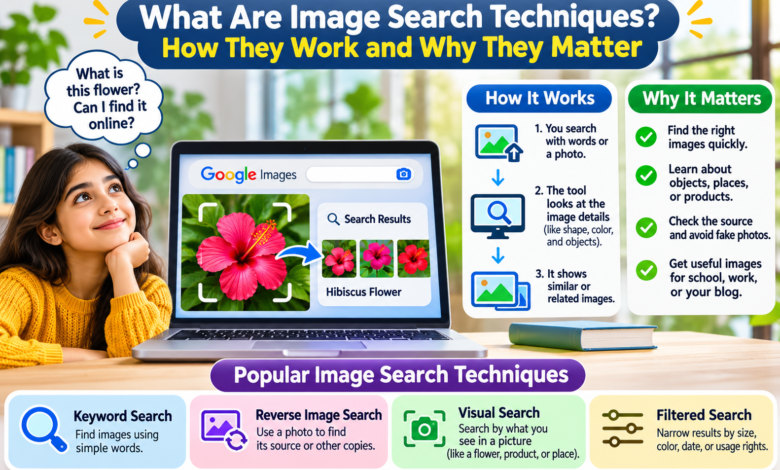
Have you ever seen a picture online and wanted to know where it came from? Maybe you found a nice photo but could not find its source. You may also want to find a clear image for school, work, or your blog. This is where Image Search Techniques can help you. These methods make it easier to find, check, and learn about pictures on the internet.
You can search with words, upload a photo, or use tools that find similar images. You do not need special skills to get started. With the right steps, you can save time and find better results. In this guide, you will learn how image searches work, which tools to use, and why these methods matter in daily life.
What Are Image Search Techniques?
Image Search Techniques are methods that help people find pictures on the internet. You can use words, photos, or image links to search for what you need. Search engines then show pictures that may match your search. These methods help you find images, learn about objects, and check where a photo came from.
For example, imagine you see a photo of a red flower. You want to know its name. You can upload the photo to Google Lens. The tool will look for similar flowers and give you possible names. You can then read more about the flower. This makes image search useful for school, work, shopping, and daily tasks.
How Do Image Search Techniques Work?
Image searches work by finding pictures that match your words or photos. When you type a search, the search engine looks for images linked to those words. It may use the page title, nearby text, file name, and other details to help find a match. For example, searching for “small brown puppy” may show photos that fit those words.
A visual search works in a different way. You give the tool a picture instead of a word. It looks at shapes, colors, patterns, and objects in that picture. It then compares those details with images it knows about. Some tools look for related objects. Others look for copies of the same photo. The results depend on the tool and the quality of the picture.
Different Types of Image Search Techniques
1. Keyword Image Search
Keyword image search is one of the easiest methods. You type words that describe the picture you want. The search engine then shows images linked to those words. If you need a photo of a blue car, you can search for “blue sports car.” Adding more details can help you get better results. For example, “blue sports car on a road” gives the search engine a clearer idea of what you need.
2. Reverse Image Search
Reverse image search lets you use a photo to search for other copies of that image. It can help you find websites that use the same picture. You may also find a larger or less edited copy. This method helps when you want to check a photo’s history. However, the oldest result does not always show who took the picture first.
3. Visual Search
Visual search helps you learn about things you see in a photo. You can search for clothes, plants, animals, furniture, and many other objects. For example, you may see a chair in a picture but not know its name. A visual search tool can find similar chairs and show related web pages. Some tools also let you select one part of a photo.
4. Filtered Image Search
Filtered image search helps you narrow your results. Some search engines offer filters for size, color, image type, and date. You can use these filters when you need a certain kind of photo. For example, a student making a poster may want large pictures. A designer may need an image with a clear background. Filters make it easier to find pictures that meet those needs.
How to Search for Images on Google
Google Images is a simple place to start. Open your browser and visit Google. Type a clear word or short phrase into the search box. Next, choose the Images tab. You will see pictures from many websites. Click a picture to see a larger view and the page where it appears.
If you want to narrow the results, select Tools. You may see choices for size, color, time, and usage rights. These choices can change based on your device and search. It is also smart to visit the page that holds the picture. That page may tell you more about the image, its date, and how it can be used.
How to Use Google Lens for Image Search
Google Lens is a useful tool for searching with photos. On a computer, open Google and select the search-by-image icon. You can upload a photo from your device. You may also drag a picture into the search box or paste an image link. Google Lens will then show related results.
You can also use Google Lens on supported phones. Open Lens through an app that offers it, then take a photo or choose one you have saved. You can search for a plant, translate words on a sign, or find products that look like something in your photo. If the result is not right, try a clearer photo or add a few words to the search.
Best Tools for Image Search Techniques
Google Images and Google Lens
Google Images works well when you know what words to search for. Google Lens is more useful when you have a photo but do not know what to call the object. Together, they can help with school projects, shopping, travel, and photo research. Lens can also read text in pictures and show related information.
Bing Visual Search
Bing Visual Search is another way to search with pictures. You can upload a photo, paste an image link, or use a saved picture. Bing can show related photos, product pages, and websites that use the image. It is useful when you want to compare items or look for visual matches. The results may differ from those on Google, so trying both can help.
TinEye Reverse Image Search
TinEye focuses on finding matches to a photo. It can find copies that have been resized, cropped, or edited. This makes it helpful when you want to check where a picture appears online. You can upload a file or paste an image link. TinEye is less suited to finding a different photo of the same object. It works best when you want to track one image or its changed copies.
Smart Image Search Techniques for Better Results
A good image search starts with clear words. Instead of searching for “dog,” try “small white dog playing in grass.” This gives the search engine more details. You can also use quotation marks around a short phrase when you want to search for those exact words. If you want results from one website, use the site: search command.
Another smart method is to crop your photo. For example, a picture may show a person holding a bag. If you only want to find the bag, crop the photo so the bag fills most of the image. Then try visual search again. You can also compare results from more than one search tool. Each tool may find different pages or photos.
How to Find the Original Source of an Image
Finding the source of a photo is one of the most useful Image Search Techniques. Start by uploading the picture to a reverse image search tool. Look at the pages that use it and check their dates. Search for the photographer’s name, a photo credit, or a link to the original page.
Do not assume the first result is the true source. A website may have copied the image from another page. Dates can also be missing or wrong. If you need proof, look for a trusted news page, the photographer’s own website, or another clear record. Checking more than one source can help you avoid mistakes.
Why Are Image Search Techniques Important?
Image Search Techniques matter because pictures play a big part in how we learn and share news. People use photos in school work, websites, online shops, and social posts. A good image can help explain a hard topic. It can also help people understand a product before they buy it.
These methods can save time. You may find an item without knowing its name. You can also check whether an old photo is being shared as new. This does not mean every search result is true. You still need to read the page and check the facts. Image search works best when you use it with care.
Benefits of Image Search Techniques for Students and Bloggers
Students can use image search to find maps, charts, animals, and photos for school projects. A clear picture can make a lesson easier to understand. Students can also use reverse image search to learn where a photo first appeared and whether its story is correct.
Bloggers can use Image Search Techniques to research topics and find ideas for their own pictures. They can also check if someone else uses their photos. For blog SEO, image names and alt text matter. Alt text is a short description that helps people and search engines understand a picture. A clear file name, useful alt text, and a fast-loading image can help make a web page better.
How to Find Images You Can Use Legally
Finding a picture online does not mean you can use it for free. Many photos belong to the people who made them. Before you add an image to your blog, check its license. A license tells you how you may use the image and whether you must give credit.
Google Images offers a Usage rights filter to help you find photos with license details. You should still open the source page and read those details. Some photos allow use with credit. Others may need payment or have rules about changes. You can also use photos you took yourself. This is a good way to make your content more original.
Common Mistakes People Make During Image Search
One common mistake is using words that are too broad. A search for “house” can show many kinds of homes. Adding a style, color, or place can make the results more useful. Another mistake is choosing a blurry photo. A clear image can help visual search tools find better matches.
People also make mistakes when they trust a picture without checking its source. A photo may have a wrong title or appear with a false story. Some people download images without checking their rights. Others upload private photos to search tools without thinking about who may see the data. Read the tool’s privacy rules before sharing personal images.
Can Image Search Techniques Help Find Fake Photos?
Image search can help you check some false or misleading pictures. For example, a post may claim that a photo shows a new event. A reverse image search might show that the same picture appeared years ago. This can be a sign that the post has the wrong date or story.
Still, an image search cannot prove that every photo is real. Some edited or AI-made pictures may have no older matches online. Always check the page, the date, and the source. Look for other trusted reports about the same event. Use image search as one part of your research, not as the only proof.
The Future of Image Search Techniques
Image search keeps changing as search tools improve. New systems can use AI to help find objects, read words, and understand what is in a photo. Some tools let users add written questions to a picture search. This can make the results more helpful. Even with these changes, people still need to check facts and respect image rights. Better tools can make searching easier, but good judgment remains important.
Final Thoughts
Image Search Techniques make it easier to find and learn about pictures online. They help students, bloggers, shoppers, and many other people. You can search with words, upload a photo, or use tools like Google Lens, Bing Visual Search, and TinEye. Each method has its own purpose. Some help you find similar items, while others help you track copies of a photo.
The best way to search is to use clear words, try the right tool, and check the results. Always look at the image source and its license before using a picture. With practice, you can find better images, avoid false claims, and make smarter use of the internet.