

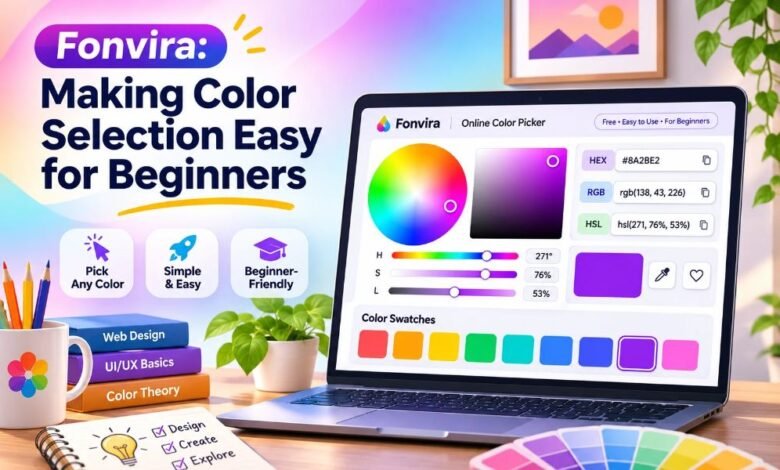
Colors make our world bright and beautiful. They help us share ideas, show feelings, and create lovely designs. But finding the right color for a website or picture can be hard. This is where Fonvira can help. Fonvira is a free online color picker that makes choosing colors simple. It helps people find colors and get the right color codes without using hard tools.
You do not need to be a design expert to use it. Students, website owners, and new designers can all enjoy its simple features. The tool shows colors in different forms, such as HEX, RGB, and HSL. It also lets you see a color before you use it. In this guide, you will learn what Fonvira is, how it works, its main features, and why it can be useful for beginners.
What Is Fonvira?
Fonvira is a free online tool that helps people choose and understand digital colors. It works in a web browser, so you do not need to install any special software. Its main job is to help users pick a color and find its code. Every digital color has a value that computers can read. These values help websites and apps show the right shade.
Fonvira gives users three common color formats: HEX, RGB, and HSL. It also shows a live preview of the selected color. This makes it easier to know what the color looks like before adding it to a design. The website focuses on simple color tasks rather than large design projects.
How Does Fonvira Work?
Fonvira works by turning a chosen color into digital color codes. First, a user opens the website and picks a color. The tool then shows the color on the screen. It also gives matching RGB and HSL values. If the user already knows a HEX code, they can enter that code instead. The tool will show the related values right away.
For example, a person working on a website may need a bright blue color for a button. They can pick blue in Fonvira and copy the code into their website style settings. This saves them from working out the color numbers by hand. The steps are short, and beginners can learn them with a little practice.
Why Is Fonvira Helpful for Beginners?
Learning about colors can feel hard at first. New designers may not know why one shade looks good while another looks dull. They may also find color numbers confusing. Fonvira makes the first steps easier by showing a color and its values together. Users can try new shades without needing to understand every code right away.
For example, a student making a school website can test several colors and see which one looks best. A new blogger can find a color that fits a logo or page heading. The tool does not teach every part of design, but it helps users become more familiar with digital colors through practice.
Main Features of Fonvira
Fonvira has a small group of useful features. Its color picker lets users choose a shade without typing a long code. Its HEX input lets them enter a color they already know. The live preview shows how that shade looks on the screen. The tool also gives matching RGB and HSL values, which are useful in different kinds of digital work.
Another helpful feature is its copy button. Rather than writing down a color code, users can copy it and paste it where needed. According to the official website, the tool is free and does not require an account. These features make Fonvira useful for people who want to finish a simple color task without learning a large design program.
Understanding HEX Color Codes
HEX is a common way to write colors for websites. A HEX color code starts with a hash sign (#) and is often followed by six letters or numbers. For example, #FF0000 means red, #0000FF means blue, and #FFFFFF means white. These codes tell a computer which color to show. Website designers often use them because they are short and easy to save.
Fonvira helps users find HEX colors without needing to memorize the codes. You can pick a color, see its value, and use that value in a design. Once you know a HEX code, you can use it again in many places. This helps keep the colors on a website the same from page to page.
What Are RGB Colors?
RGB stands for Red, Green, and Blue. These are three colors of light used to create many other colors on digital screens. Each RGB value has three numbers. The numbers usually go from 0 to 255. For example, rgb(255, 0, 0) means red. The first number tells how much red is used.
The next two numbers tell how much green and blue are used. When all three numbers are 0, the result is black. When all three are 255, the result is white. Fonvira shows the RGB value for a color you choose. This is helpful when a website, app, or piece of code needs RGB numbers instead of a HEX value.
What Are HSL Color Codes?
HSL stands for Hue, Saturation, and Lightness. These three parts help explain how a color looks. Hue is the type of color, such as red, green, or blue. Saturation shows how strong or dull a color is. Lightness shows how light or dark it is. For example, hsl(0, 100%, 50%) gives a bright red color.
Changing the lightness can make a shade look softer or darker. HSL is useful when people want to make small changes to a color. Fonvira shows HSL values along with HEX and RGB codes. Beginners can compare these values to learn more about how colors work and why different codes can describe the same shade.
How to Use Fonvira Step by Step
Using Fonvira is simple, even if you have never worked with color codes before. Start by visiting fonvira.com in your web browser. When the page opens, look for the color picker. Choose a color that you like. The tool will show a preview and the matching color values. If you already have a HEX code, you can enter it into the HEX field instead.
Next, look at the RGB and HSL values shown on the page. Choose the code that your project needs. Press the copy button beside that value. You can then paste it into a website style file or another tool that accepts the format. If the shade does not fit your design, return to the picker and try another color.
How Fonvira Helps With Website Design
Colors are an important part of every website. They help visitors find buttons, read headings, and understand page sections. A website with too many bright colors can look messy, while colors that are too similar may make words hard to read. Fonvira can help website owners find exact color values for backgrounds, headings, links, and buttons.
For example, a shop owner may want dark blue headings and a light background. They can pick those shades and save the codes for later use. This makes it easier to use the same colors across the site. However, Fonvira is a color picker, not a full website builder. Users still need another tool to create or edit their web pages.
Why Color Choice Matters in Digital Design
Good colors can make a design easier to understand. Bright colors may draw attention to a special button or message. Soft colors may help create a calm look. Dark text on a light background is often easier to read than light gray text on white. These small choices matter because people need to find and read information quickly.
Fonvira helps people try colors and find the codes they need. Still, a nice color does not always mean a readable design. Users should test their text and background colors with a separate contrast checker. A useful target is a contrast ratio of at least 4.5:1 for normal text. This can help make websites easier to read.
Benefits of Using Fonvira for Everyday Projects
One of the main benefits of Fonvira is that it keeps color selection simple. People can use it without paying for a design plan or creating an account. The tool runs in a browser, which makes it handy on a computer or phone. Its live preview also helps people see a shade before copying its code.
This can save time when working on small projects. A blogger may need a new heading color, while a student may need colors for a class web page. A developer may need to turn a HEX value into RGB. Fonvira can help with each of these tasks. Its greatest strength is doing a few useful jobs clearly instead of trying to offer every design feature in one place.
Can Fonvira Help Students and New Designers?
Fonvira can be a useful learning tool for students who want to understand digital colors. For example, a student learning HTML and CSS may see a HEX code in a lesson but not know what color it makes. They can enter that code into Fonvira and view the result. They can also compare it with RGB and HSL values to learn how these formats work.
New designers can use the tool to test ideas for school projects, simple websites, and online graphics. It can help them feel more comfortable with color codes. However, learning good design also takes practice. Students should learn about clear text, spacing, and color contrast along with using a color picker.
Is Fonvira Free and Safe to Use?
Fonvira states that its color tool is free and does not require a sign-up or paid plan. Its official About page says the tool works on desktop and mobile browsers. The site’s privacy policy, updated on June 22, 2026, says that color values are handled on the user’s device rather than stored on Fonvira’s servers.
This is a useful privacy feature for everyday color work. However, the website still uses outside services for some tasks. Its policy mentions Google Fonts, website security services, and a provider for contact messages. These services may handle some technical data. Users should read the current privacy policy when privacy is important. As with any online tool, they should also make sure they are visiting the correct website.
What Are the Limits of Fonvira?
Fonvira is helpful, but it cannot do every design task. Its main features focus on picking colors, showing previews, and converting common color values. The website does not list full photo editing, logo making, or automatic color palette building as its main features. Users who need those jobs may have to use other design software.
Fonvira also does not list a built-in tool that checks the contrast between two colors. That means a user should test text and background colors separately before publishing a website. It is also important to remember that colors may look a little different on different screens. A color code helps keep the value the same, but it cannot make every screen display that color in exactly the same way.
Simple Tips for Choosing Better Colors
Choosing the right colors becomes easier when you follow a few simple ideas. Start with one main color that fits your project. Then choose one or two extra colors that work well with it. Avoid using too many bright shades on the same page because they can make the design hard to follow.
Make sure the words are easy to read against the background. You can use Fonvira to try new shades and save their codes. If you find a color you like, write down its HEX code in a small list. This makes it easy to use that color again. You should also look at your design on a phone and a computer, since the same page can feel different on each screen.
Fonvira Compared With Larger Design Tools
Some design programs let users draw pictures, change photos, build layouts, and work on many pages. These tools can be useful, but they may also take time to learn. Fonvira has a smaller purpose. It helps users choose a color and get the matching HEX, RGB, and HSL values.
This makes it a handy extra tool for a person who already uses a website editor or graphic design program. For example, a designer may build a picture in another app but use Fonvira to check a color code. The two tools can work together. Fonvira is a good choice for simple color tasks, while a larger program may be better when a project needs full design and editing features.
Final Thoughts
Fonvira is a simple and useful online tool for anyone who wants to learn about digital colors. It helps users choose shades, see live previews, and find HEX, RGB, and HSL values without using a hard design program. Its free access and easy steps make it a good starting point for students, bloggers, and beginner website designers.
It is not a complete design program, but it can make one common job much easier. By using Fonvira along with good color choices and basic contrast checks, beginners can create cleaner and more readable digital projects. The best way to learn is to try a few colors, compare their values, and see how they look in a real design.