

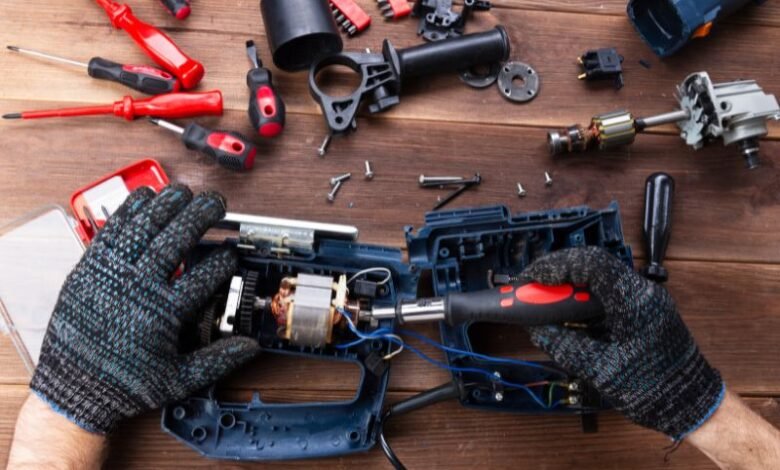
Dust is easy to ignore when a cordless drill, saw, sander, or impact driver is working normally. The problem is that fine particles rarely stay on the outside. They work their way into ventilation openings, switches, bearings, chucks, and other moving components, where accumulation can gradually affect performance.
For anyone who relies on cordless power tools, routine debris control is less about cosmetic cleaning and more about protecting airflow, mechanical movement, and battery-powered performance. A few minutes of maintenance after demanding jobs can prevent small amounts of dust from becoming a recurring equipment problem.
Why Dust Management Matters More for Battery-Powered Tools
Cordless tools depend on compact motors, electronic controls, and battery systems working within relatively tight operating conditions. When ventilation openings become restricted, heat has a harder time escaping.
Wood dust, drywall particles, sawdust, and jobsite debris can also settle around moving interfaces. The buildup may not cause an immediate failure, but it can increase friction and interfere with components that need to move freely.
A useful maintenance principle is simple: clean the tool before debris becomes embedded. Removing loose dust is considerably easier than dealing with compacted material around a bearing, gear housing, or ventilation channel.
Start With the Tool’s Ventilation Openings and Airflow Path
Why clear vents are a first-line maintenance check
Most cordless tools have strategically placed openings that allow air to move through or around the motor and electronics. These passages should remain unobstructed.
Before cleaning, remove the battery and inspect the housing. Look for packed dust around intake and exhaust openings, particularly after cutting, sanding, routing, or drilling materials that produce fine particles.
Use a soft brush or dry compressed air where appropriate to dislodge loose material. Avoid forcing debris deeper into the housing. The goal is to move particles away from the tool, not simply relocate them internally.
Clean Moving Parts Without Overdoing It
Focus on areas where debris naturally accumulates
Moving components deserve a more targeted approach. Chucks, blade guards, adjustment mechanisms, trigger areas, and exposed gear interfaces can collect dust because their movement creates small gaps where particles settle.
Brush away loose debris first. If a component has become noticeably stiff, investigate the cause rather than immediately applying lubricant. Not every moving part should be lubricated, and excess oil can attract additional dust.
For example, a dusty adjustment mechanism may need cleaning rather than lubrication. Adding oil to a dirty mechanism can create an abrasive paste that is more difficult to remove later.
Match Cleaning Methods to the Type of Debris
Not all dust behaves the same way. Coarse wood chips are relatively easy to remove, while fine sanding dust can cling to surfaces and penetrate openings.
A practical approach is:
- Loose chips: Use a soft brush or controlled air.
- Fine dust: Brush carefully and use appropriate low-pressure air to clear openings.
- Sticky residue: Follow the tool manufacturer’s cleaning guidance rather than introducing solvents randomly.
- Compacted debris: Loosen it gradually instead of pushing it farther into the housing.
This distinction matters because aggressive cleaning can create its own problems. High-pressure air directed into sensitive areas may drive particles farther inside the tool.
A Five-Minute Post-Job Cleaning Routine That Actually Works
A maintenance routine does not need to be elaborate. For frequent users, consistency is more valuable than occasional deep cleaning.
Follow this sequence after dusty work
- Disconnect the battery. Never begin cleaning while the tool can be energized accidentally.
- Shake or brush off loose debris. Start with the exterior and work toward areas where dust collects.
- Inspect ventilation openings. Check both intake and exhaust areas for visible accumulation.
- Check moving components. Look for restricted movement, packed dust, or unusual resistance.
- Inspect the battery interface. Keep contacts and surrounding areas free of dust and debris.
- Clean accessories separately. Blades, bits, sanding attachments, and guards can carry debris back onto a clean tool.
- Store the tool in a dry location. Avoid leaving it exposed to unnecessary jobsite dust.
This quick routine can often be completed in several minutes and makes problems easier to spot while they are still minor.
When a Brush Is Better Than Compressed Air
Compressed air is useful, but it should not automatically be the first choice for every cleaning task.
A soft, clean brush gives you more control around switches, seams, ventilation openings, and delicate mechanisms. It also lets you physically pull dust away from the tool rather than potentially forcing it inward.
Compressed air can be useful for clearing accessible vents and removing loose particles from hard-to-reach areas. However, avoid excessively high pressure and prolonged blasts at close range.
The decision is straightforward:
| Cleaning situation | Preferred approach |
| Surface dust | Soft brush |
| Loose chips | Brush or controlled air |
| Dust around vents | Brush followed by controlled air |
| Packed debris | Carefully loosen first |
| Sensitive internal areas | Follow manufacturer guidance |
Protect the Battery Interface From Jobsite Debris
The battery connection area deserves more attention than it usually receives. Dust that accumulates around the interface can interfere with clean contact between the tool and battery.
Before installing a battery, inspect the connection area for visible debris. Never scrape contacts aggressively or introduce moisture into the electrical connection.
Battery care also means avoiding unnecessary contamination during storage. Keeping batteries and tools away from piles of sawdust, loose drywall dust, and damp surfaces reduces the amount of material that eventually reaches the connection points.
Common Cleaning Mistakes That Shorten Tool Life
Several maintenance habits seem harmless but can create avoidable problems.
Blowing debris deeper into the housing
A powerful air blast can make a tool look clean externally while pushing dust farther into internal spaces. Controlled airflow is preferable to maximum pressure.
Cleaning with excessive moisture
Cordless tools contain electrical and electronic components. A wet cloth or liquid cleaner should not be allowed to introduce moisture into vents, switches, battery contacts, or housing seams.
Lubricating every moving component
More lubricant does not automatically mean smoother operation. Some components require specific lubrication, while others should remain dry. Always follow the manufacturer’s recommendations.
Ignoring unusual sounds
A change in pitch, grinding noise, intermittent operation, or increased vibration can indicate a problem that cleaning alone will not solve. Continuing to use a tool that behaves differently can turn a minor maintenance issue into a mechanical failure.
Build Cleaning Into the Way You Work
The most effective dust-control strategy starts before cleanup. Use appropriate dust collection when sanding, cutting, or drilling. Keep work surfaces reasonably clear and avoid placing a clean tool directly into piles of debris.
For professional users, a useful habit is to designate a small cleaning station near the end of the work area. A soft brush, appropriate air source, and clean storage space make maintenance much easier to repeat consistently.
OSHA’s construction guidance emphasizes controlling airborne dust at the source, particularly during operations that generate respirable particles. OSHA construction silica safety resources
The broader lesson is important: tool cleanliness and workplace dust control are related, but they are not the same task. Cleaning the tool protects the equipment; proper dust-control practices protect the work environment.
Know When Routine Cleaning Is No Longer Enough
Cleaning is preventive maintenance, not a substitute for repair. If a cordless tool continues to overheat, loses power unexpectedly, produces unusual sounds, develops excessive vibration, or has a mechanism that remains difficult to operate after cleaning, stop and inspect it according to the manufacturer’s service guidance.
The same principle applies to damaged housings, compromised cords or accessories, cracked guards, and battery damage. A clean tool is not necessarily a safe tool if a component has been physically compromised.
The National Institute for Occupational Safety and Health provides extensive guidance on workplace exposure to airborne particles and the importance of appropriate controls. NIOSH workplace safety resources
FAQ: Keeping Cordless Tools Free of Dust and Debris
How often should cordless power tools be cleaned?
Clean them after particularly dusty jobs and perform a quick inspection during regular use. Frequent users may benefit from a brief inspection every time the tool is put away.
Can compressed air be used to clean cordless tools?
Yes, when appropriate, but use controlled airflow and avoid forcing debris into vents, switches, bearings, or other sensitive areas. Follow the manufacturer’s cleaning instructions.
Should I lubricate a dusty moving part?
Clean it first and determine whether lubrication is actually specified for that component. Adding lubricant to accumulated dust can make the contamination harder to remove.
Why are ventilation openings important?
They help maintain airflow around heat-producing components. Restricted openings can contribute to heat buildup and reduced operating performance.
What is the easiest maintenance habit to adopt?
Make a quick post-job inspection part of putting the tool away: remove the battery, brush off debris, check vents, inspect moving parts, and store the tool properly.
A Cleaner Tool Is Easier to Inspect and Easier to Trust
Dust maintenance is not about making a cordless tool look new after every use. It is about maintaining the conditions that allow its mechanical, electrical, and thermal systems to operate as intended.
The best routine is also the simplest: remove debris before it accumulates, keep airflow paths clear, treat moving components selectively, protect battery connections, and investigate changes in performance rather than working around them.
For tradespeople and serious DIY users alike, those small habits can make equipment easier to inspect, more predictable to operate, and better prepared for the next demanding job.