
Remote work has changed how many businesses operate. Today, employees can work from home, shared offices, or different cities. This gives people more freedom. It also creates new challenges for business owners. Managers need to know if tasks are moving forward. They also need to track work hours and meet project goals. This is where Remote Employee Monitoring Software can help. These tools allow businesses to review work time, task progress, and daily activity.
Some tools also offer screenshots and useful reports. However, not every tool is right for every team. Some focus on time tracking, while others offer more detailed work reports. Choosing the right software can help a business save time and improve teamwork. In this guide, you will learn how to choose the best Remote Employee Monitoring Software in 2026, what features to check, and how to protect employee privacy.
What Is Remote Employee Monitoring Software?
Remote Employee Monitoring Software is a tool that helps businesses understand how employees spend their work time. Managers can use it to review work hours, task activity, and team progress. Many tools collect work data and show it on one dashboard. This makes it easier to see how a team uses its time.
Some programs record the apps and websites used during work. Others help teams track projects and prepare timesheets. A timesheet is a record of hours worked. These tools can help companies that have employees in different places. However, each program works in its own way. Some only track time, while others collect more details. Business owners should learn what each tool records before using it.
Why Do Businesses Need Remote Employee Monitoring Software in 2026?
Remote work offers many benefits. Employees can spend less time traveling and enjoy more freedom. Businesses can also hire workers from different locations. Yet managing a remote team needs good planning. A manager cannot always see when someone starts a task or finishes a project. Remote Employee Monitoring Software can help fill this gap.
It gives managers a clearer view of work hours and project needs. For example, a company may find that one task takes longer than planned. The manager can then offer help or change the work plan. These tools can also support billing when workers receive pay by the hour. The main goal should be better work planning, not watching every move an employee makes.
How to Choose the Best Remote Employee Monitoring Software
Choosing the best Remote Employee Monitoring Software starts with knowing what your business needs. A small company may only need simple time reports. A large company may need team reports, access controls, and links to other work tools. Some businesses need to track billable hours.
Others want to learn why projects take too long. Before buying software, write down the problems you want to solve. Then look for tools that match those needs. Do not choose a program just because it has many features. Extra features can raise costs and make the system harder to use. A simple tool that solves your main problem may be the better choice.
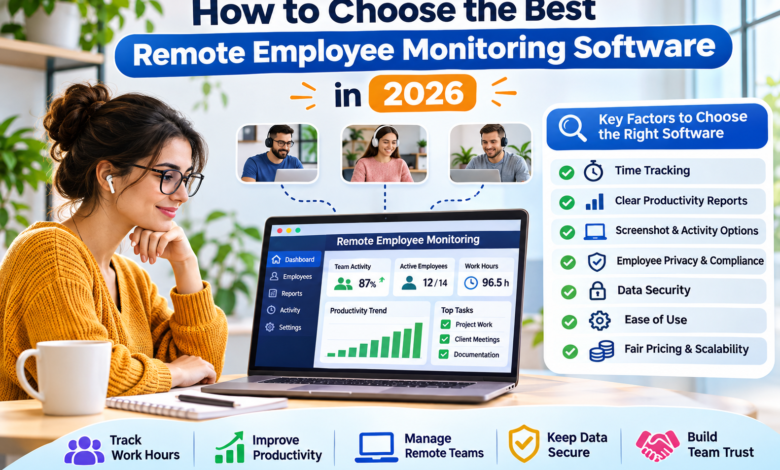
1. Check the Time Tracking Features
Time tracking is one of the most useful parts of employee monitoring software. It helps a business record when work begins and ends. It can also show how much time employees spend on different tasks. This is helpful for companies that pay workers by the hour. It can also help when preparing bills for clients.
Look for software that allows employees to review and fix their time records. Some tools use a start-and-stop timer. Others record work time through an app. The best choice depends on how your team works. Good time tracking should make daily work easier, not add more stress.
2. Look for Clear Productivity Reports
Productivity means how much useful work gets done. Good monitoring software should help managers understand work progress. Some tools show time spent on apps, websites, and tasks. They may also show active and idle computer time. Idle time is when a computer gets little or no keyboard or mouse activity.
However, low computer activity does not always mean someone is not working. An employee may be reading, thinking, or speaking with a client. Managers should look at finished work along with activity reports. A good report helps a team solve problems. It should not judge workers by mouse clicks alone.
3. Review Screenshot and Activity Options
Some Remote Employee Monitoring Software tools offer screen capture. This feature takes pictures of a computer screen during work. It may help some businesses check task activity or keep work records. Yet screenshots can also capture private messages, passwords, or customer details.
For this reason, businesses should use this feature with care. Look for tools that let managers turn screenshots off or blur private details. It is also helpful when employees can see what the tool records. Not every team needs screenshots. Many businesses can manage work through time reports and completed tasks. Choose only the tracking features that serve a clear work need.
Choose Software That Protects Employee Privacy
Employee privacy is one of the most important things to check in 2026. Remote employees may use the same computer for work and personal tasks. A monitoring tool should not collect private data without a clear and lawful reason. Businesses should tell workers what the software records, when tracking happens, and who can see the data.
They should also explain how long records will stay saved. Monitoring laws differ by country and region. For example, the UK’s Information Commissioner’s Office says employers must use fair and lawful monitoring methods. It also stresses clear notice and respect for workers’ rights. A business should check the rules that apply to its workers before starting any new tracking system.
Check Software Security and Data Protection
Employee monitoring tools may store private business details. These can include work schedules, screenshots, and records of app use. If someone gains access to this data, it can cause serious problems. That is why strong security matters. Look for software that protects data when it moves between devices and servers.
It should also let managers control who can view reports. Two-step login can add another layer of safety. A good provider should explain where it stores data and how it removes old records. Businesses should also ask what happens to stored data when they close an account. Never assume that a tool is safe simply because it is popular.
Make Sure the Software Is Easy to Use
A useful tool should be simple for both managers and employees. A hard system can waste time and lead to mistakes. Before buying Remote Employee Monitoring Software, test its main features. Check how workers start and stop tracking. See if managers can find reports without searching through many pages.
The software should also work with the devices your team uses. Some workers may use Windows computers, while others use Mac or Linux systems. Mobile support may matter for teams that work away from a desk. A clear dashboard and simple setup can make daily tasks easier. Good training will also help workers feel more confident when using the new tool.
Compare the Cost of Remote Employee Monitoring Software
Price is another key factor when choosing software. Some providers offer free plans for small teams. Others charge a monthly fee for each employee. This means the total cost may grow as you hire more people. For example, a plan that costs $8 per worker each month would cost $160 a month for 20 workers.
This is only a sample calculation, not a price quote from a provider. Businesses should also check for extra charges. Some companies charge more for screenshots, long-term data storage, or advanced reports. Annual plans may offer a lower monthly rate, but they can require a longer payment promise. Compare the full cost before choosing a plan.
Popular Remote Employee Monitoring Software Options in 2026
Several tools can help businesses manage remote employees. Each one offers a different mix of features. The best option depends on your team size, work type, and privacy needs.
Hubstaff
Hubstaff offers time tracking, work reports, activity levels, and optional screenshots. It also supports project work and team planning. Businesses can change many tracking settings to match their needs. This makes it worth considering for remote teams that track hours for projects or client bills.
Time Doctor
Time Doctor helps businesses track work hours, tasks, and app use. It can also provide activity reports and optional screen capture. These features may help managers understand how teams spend their working time. Companies should check the available plans and tracking settings before choosing it.
ActivTrak
ActivTrak focuses on work activity and team reports. It helps managers study how employees use apps and work time. It also offers privacy controls and does not include keystroke logging. This may suit businesses that want work insights without recording everything workers type.
These are examples, not a single ranking for every business. Product features and prices can change. Always check each provider’s latest plan details.
Test the Software Before Making a Final Choice
A free trial or product demo can help you learn whether a tool fits your team. Choose a small group of employees and test the software on real tasks. Start with basic time tracking and reports. Check whether the data is clear and useful. Ask employees if the tool is easy to use and whether its settings respect their privacy.
Managers should also look for problems with slow devices, missing records, or hard-to-read reports. Compare the tool with your first goals. If it does not help solve those problems, look at another option. A short test can help a business avoid buying a tool that creates more work than it saves.
How to Introduce Monitoring Software to Your Team
A good rollout starts with clear communication. Tell employees why the business plans to use monitoring software. Explain which data it will collect and how managers will use it. Give workers a chance to ask questions. A written policy can help everyone understand the rules.
Keep tracking limited to what the business needs and what the law allows. Do not turn on every feature just because it is available. Review your rules as the team grows or work habits change. Employee feedback is also important. When workers understand the reason for monitoring, it can be easier to build trust and use the software in a fair way.
Common Mistakes to Avoid When Choosing Monitoring Software
One common mistake is buying a tool without knowing what problem it should solve. Another is choosing too many tracking features. This can raise costs and create privacy risks. Some managers also place too much value on active computer time.
Yet a person can do good work while reading, planning, or joining meetings. Businesses should also avoid hidden tracking and weak data security. Poor training is another problem. If employees do not understand the software, work records may be wrong. The better approach is to set clear goals, check privacy rules, test the software, and review results with care.
Benefits of Choosing the Right Remote Employee Monitoring Software
The right monitoring tool can make remote team management easier. It can help businesses keep clear work records, plan projects, and spot tasks that need more support. Time reports can also help with hourly pay and client billing. Managers may find work delays early and offer help before a deadline is missed.
Employees can benefit from clear records of their hours and completed tasks. Still, software alone cannot make a team more productive. Good leadership, fair goals, and open communication also matter. Remote Employee Monitoring Software works best when it supports these habits instead of replacing them.
Final Thoughts
Choosing the best Remote Employee Monitoring Software in 2026 takes careful planning. Businesses should look for a tool that is easy to use, keeps data safe, and offers the features their teams need. Time tracking, clear reports, fair pricing, and privacy controls are key factors.
Before buying, compare several tools and test one with a small team. Most importantly, use monitoring software to support employees rather than watch every action. When a business combines helpful tools with trust and clear goals, remote teams can work better together and achieve stronger results.