

A strong computer network helps a business work every day. It connects computers, servers, printers, and other devices. It also helps workers share files and use the internet. But a network needs the right settings to work well. One wrong setting can cause slow speeds, lost connections, or security problems. This is where Network Configuration Management becomes important.
It helps IT teams check, save, and control network settings. It also helps them find problems before they become serious. Many businesses use this method to keep their networks safe and stable. In this guide, you will learn what Network Configuration Management means, how it works, and why it matters. You will also learn about its main features, benefits, tools, and best practices.
What Is Network Configuration Management?
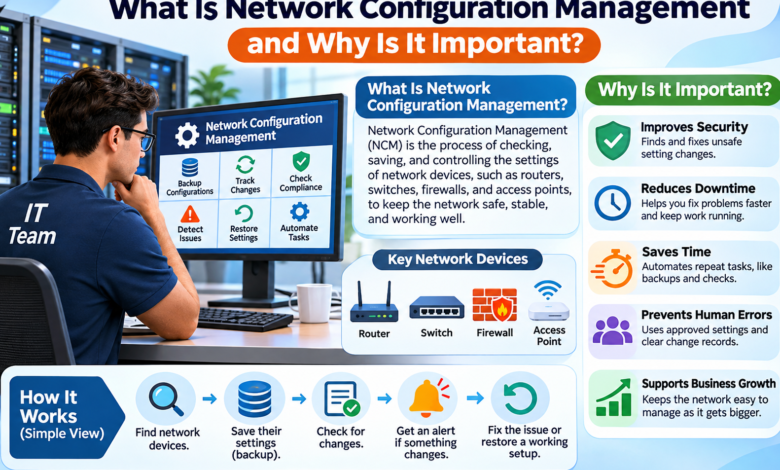
Network Configuration Management is the process of checking, saving, and controlling the settings of network devices. These devices include routers, switches, firewalls, and wireless access points. Each device has settings that tell it how to work. For example, a router uses settings to send data to the right place.
A firewall uses rules to help block unsafe traffic. IT teams must keep these settings correct to protect the network. Network Configuration Management gives them a clear way to handle this work. It helps them find changes, save old settings, and fix mistakes. It can also make sure devices follow the same rules. This makes the network easier to manage, even when a business has many devices.
How Does Network Configuration Management Work?
Network Configuration Management works by collecting and checking settings from network devices. First, an IT team finds the devices connected to the network. Next, it saves a copy of each device’s settings. This copy helps the team know how the device should work. The team may call this an approved setup or baseline.
The system can then check for changes in those settings. If someone changes a rule, the system can record it. Some tools can also send an alert about the change. The IT team reviews the new settings to make sure they are safe. If a mistake causes trouble, the team can use a saved copy to help restore the old setup. This process helps prevent small errors from becoming large network problems.
Why Is Network Configuration Management Important?
Network Configuration Management plays a major role in keeping business networks safe and reliable. Modern companies use many devices to send and receive data. Each device needs the right settings to work with the others. Without proper control, one small mistake may affect many workers. Good network management helps reduce this risk. It also gives IT teams more time to focus on other important work.
1. Improves Network Security
Network security is one of the main reasons businesses use Network Configuration Management. Network devices control how data moves through a company. If someone changes a firewall rule, it may allow unsafe traffic into the network. An incorrect setting may also give users more access than they need.
NCM helps teams find these problems by checking device settings. It can show when a rule has changed and help staff review that change. Teams can then remove unsafe settings or restore approved ones. This does not stop every online attack, but it helps lower the risk caused by poor network settings.
2. Reduces Network Downtime
Network downtime means a network or service stops working. It can make it hard for workers to use business tools. Customers may also lose access to a website or online service. Incorrect device settings are one possible cause of downtime. Network Configuration Management helps teams find these errors faster.
It stores earlier settings so staff can compare old and new versions. When a recent change causes a problem, this record helps show what went wrong. The team can then fix the error or restore a working setup. Faster problem solving can help a business return to normal work sooner.
3. Saves Time for IT Teams
Managing network devices by hand can take a lot of time. An IT worker may need to open each device and check its settings. This becomes harder when a company uses hundreds of devices. Network Configuration Management tools can do many repeat tasks on a set schedule. For example, a tool may save device settings every night. It may also check settings for changes and create reports. This reduces the need to check every device by hand. IT staff still need to review important changes, but they can spend less time on basic tasks.
4. Helps Prevent Human Errors
People sometimes make mistakes when changing network settings. A worker might enter the wrong address or remove an important rule. Even a small error can stop devices from sharing data. Network Configuration Management helps reduce these problems by using approved settings and clear steps. Teams can review changes before they apply them. They can also test new settings on a small group of devices. If a change causes trouble, a saved setup may help the team fix it. These checks make network work safer and easier to control.
5. Supports Business Growth
As a business grows, its network often grows too. A small office may start with only a few devices. Later, the company may add new offices, workers, servers, and internet connections. Each new device needs the right settings. Without a clear plan, network management can become confusing. Network Configuration Management helps teams use the same approved rules across many devices. It also keeps a record of network changes. This makes it easier to add new equipment and manage a larger network. It supports growth without losing control of important settings.
Main Features of Network Configuration Management
Network Configuration Management software can offer several useful features. One key feature is configuration backup, which saves copies of device settings. Another is change tracking, which records what settings have changed. Some tools compare two saved versions and show the exact difference.
This helps teams find errors faster. Many tools also support alerts, so IT workers can learn about unexpected changes. Other features include device lists, reports, policy checks, and automated tasks. Some advanced tools can help restore earlier settings when a change causes problems. The features vary from one product to another, so businesses should choose tools that match their needs.
What Devices Can Network Configuration Management Control?
Network Configuration Management can support many types of network equipment. Routers help move data between networks. Switches connect devices within a local network. Firewalls help control which traffic can enter or leave. Wireless access points give phones and laptops a way to connect without cables.
Each type of device has its own settings and rules. NCM tools can collect and manage these settings when the device is supported. Some tools work with equipment from several brands. Others may support only certain products. Before choosing a tool, an IT team should check which devices and software versions it can manage.
A Simple Example of Network Configuration Management
Imagine a company with 100 workers and one main office. The workers use the same network for email, files, and online meetings. One day, an IT worker changes a setting on a network switch. Soon, some workers lose access to the company server. Without a saved record, finding the problem may take a long time.
With Network Configuration Management, the IT team can compare the new settings with the last working version. The team may see the setting that changed and caused the issue. After checking the problem, it can restore the correct setting. This example shows how a clear change record can help a business fix network problems faster.
Best Practices for Network Configuration Management
Good Network Configuration Management starts with a clear plan. Every business should keep a list of its network devices and their approved settings. IT teams should back up important configurations on a regular schedule. They should also save a backup before making major changes. Important updates need testing and approval before they go live.
Access to network settings should be limited to trusted staff. Teams should keep a record of who changed a setting and when it happened. They should also review reports and alerts to find unusual changes. A secure backup is just as important as a fresh one. If these records contain passwords or other secrets, the company must protect them from unwanted access.
Popular Network Configuration Management Tools
Businesses can choose from several tools to manage network settings. SolarWinds Network Configuration Manager offers backups, change tracking, reports, and policy checks. ManageEngine Network Configuration Manager also provides tools for saving configurations, reviewing changes, and managing network devices.
Oxidized is an open-source option that can collect and save configurations from supported network equipment. These tools have different features and setup needs. Some may suit large companies, while others work well for smaller IT teams. A company should check device support, security, cost, and ease of use before making a choice. It is also wise to test the tool with a few devices first.
Common Challenges in Network Configuration Management
Network Configuration Management has many benefits, but it also brings challenges. One common problem is dealing with devices from different brands. Each brand may use its own commands and settings. Older equipment may not work with modern tools. Another challenge is keeping records up to date.
If workers make changes without approval, saved settings may no longer match the real network. This is sometimes called configuration drift. Businesses may also need time to train staff and set up automation. A good plan can help solve these problems. Starting with important devices makes the process easier to manage.
Network Configuration Management vs. Network Monitoring
Network Configuration Management and network monitoring are useful, but they do different jobs. Network monitoring checks whether devices and connections are working well. It can watch traffic, device health, and network speed. It may warn staff when a connection fails or a device stops responding.
Network Configuration Management focuses on device settings and changes. It helps teams know what settings were used and what changed over time. For example, monitoring may report that a network link has failed. NCM may help find a recent setting change that caused the failure. Using both methods gives IT teams a better view of network health.
How to Get Started with Network Configuration Management
A business does not need to manage every network device at once. It can begin by making a list of its most important routers, switches, and firewalls. Next, the IT team can save a copy of each device’s current settings. The team should check these copies and create approved versions.
After that, it can choose a tool that supports its devices. A small test can help staff learn how backups, alerts, and change reports work. Once the process runs well, the business can add more devices. Teams should review the system often and improve their rules when needed. Taking small steps can make Network Configuration Management easier to adopt.
Final Thoughts
Network Configuration Management is an important part of running a safe and stable computer network. It helps IT teams control device settings, save backups, track changes, and solve problems. It can also reduce human errors and support business growth. As companies add more devices, keeping track of each setting becomes harder.
A clear management process makes this work easier. Businesses should start with their most important devices, use approved settings, and check for changes on a regular basis. With the right tools and good habits, Network Configuration Management can help keep a business network reliable, secure, and ready for daily work.