

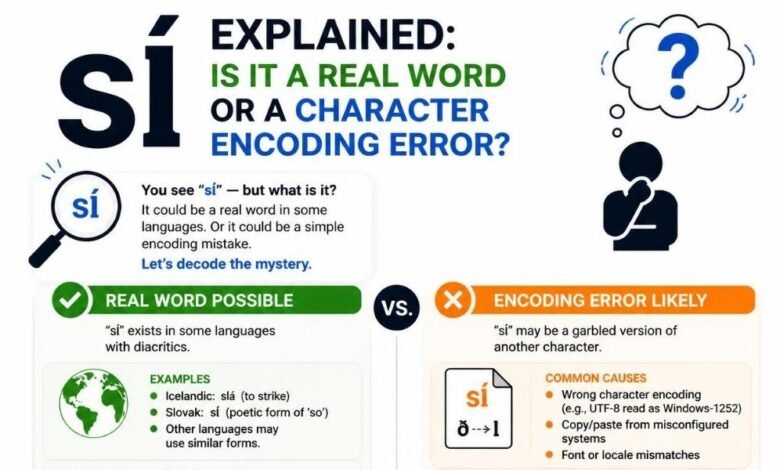
At first, sĺ looks like a tiny text mistake. Many readers may pass over it without thinking much. But for a website owner, editor, blogger, or archive manager, it can be a warning sign. It may show that an old page, PDF, database, or document has a hidden text display problem.
The term sĺ is not known as one standard word with one clear meaning. In many cases, it appears when the Scandinavian word “så” does not show correctly because of a character encoding issue. The linked source explains that sĺ is often treated as a technical display problem, not as a normal Swedish or Norwegian word.
This matters because readers trust clean text. When a page has broken letters, odd symbols, or strange words, it can feel old, weak, or careless. Even one wrong character can make useful content look less professional.
What Does sĺ Usually Mean?
The most common reason sĺ appears is simple. A system may fail to show the letter å correctly. When that happens, the original word så can change into sĺ or another strange form.
The word så is used in Swedish and Norwegian. It can mean “so,” “then,” “therefore,” or “as a result,” depending on the sentence. The source page also notes that å is an official letter in Swedish and Norwegian, so replacing it with a broken character can change how the word looks and feels.
This is why sĺ is often not a new word. It is more like a clue. It tells you something may have gone wrong when the text was saved, copied, imported, or displayed.
Why Old Websites Often Have This Problem
Old websites are more likely to show broken text. Many were built before modern standards became common. Some used older databases, old content systems, or mixed encoding settings.
When these pages are moved to a new theme, host, or CMS, text can break. Special letters may not survive the move cleanly. A word that once looked right may later appear as sĺ.
This can happen during:
-
Website migration
-
Database import
-
Theme change
-
Old HTML cleanup
-
Copying content from PDFs
-
Moving pages from one CMS to another
The problem may not appear on every page. It may show only in old posts, old comments, old product pages, or copied text blocks. That makes it easy to miss.
How PDFs and Archived Files Can Create sĺ
PDF files can also cause this issue. Many people copy text from old PDFs and paste it into websites. But PDFs do not always store text in a clean way. A letter can look correct on the screen but copy badly into another file.
Old scanned files, archived documents, and exported reports may also contain strange text. When this content is reused, broken characters can move with it.
The linked page says encoding issues may happen when copying text between apps, opening older documents, importing or exporting files, using unsupported fonts, or working with websites that do not fully support international characters.
So if sĺ appears in an article, it may not be the writer’s mistake. It may be a file history problem.
The Role of Character Encoding
Character encoding is the system that tells a computer how to store and show letters. Every letter, mark, and symbol needs a code. If one program reads that code in the wrong way, the output can look broken.
Unicode helps solve this problem. The Unicode Consortium describes Unicode as a universal character encoding standard used for text processing, storage, and exchange in modern software.
UTF-8 is one common Unicode encoding form. It helps websites and software handle many languages and symbols. The Unicode Standard supports encoding forms such as UTF-8, UTF-16, and UTF-32.
But problems can still happen when old content, old databases, or wrong settings are involved. That is why sĺ may still appear on modern websites.
Why sĺ Makes a Website Look Unprofessional
Readers may not know what encoding means. But they do notice when text looks broken.
A page with sĺ can create quick doubt. The reader may think:
-
Is this page copied?
-
Is this site old?
-
Was this article checked?
-
Can I trust the information?
-
Is the whole website poorly maintained?
That reaction matters. Online trust is built from small signals. Clean text, clear headings, working links, and correct spelling all help readers feel safe.
A broken character does not always mean the article is wrong. But it can make the page look less careful. For a blog, business site, or magazine, that can hurt the reader’s first impression.
Why sĺ Can Hurt Old Content Cleanup
Many websites have years of old posts. Some pages still get search traffic. Some have backlinks. Some support topic authority. But if those pages contain broken text, they may need cleanup.
The problem is that sĺ is not always easy to find. It may appear in one paragraph, image caption, author bio, tag, comment, or old imported excerpt.
A good content audit should check for strange characters. These may include:
-
sĺ
-
Ã¥
-
�
-
Â
-
’
-
“
-
odd question marks
-
broken accent marks
These signs often mean old text was not handled correctly. Finding them helps editors repair content before it damages reader trust.
sĺ and SEO: A Small Sign of a Bigger Issue
Search engines want to show helpful and reliable pages. A single broken word will not ruin a whole site. But many broken characters across a website can point to poor quality control.
If old posts have sĺ and other display errors, the content may look messy. Readers may leave faster. They may not share the page. They may not trust the site enough to click more links.
This can affect performance in an indirect way. The real problem is not only the character itself. The real problem is the signal it sends about content care.
For SEO, old content should be clean, readable, and useful. Fixing sĺ is part of that work.
How Editors Can Check the Problem
Editors do not need advanced coding skills to start checking for sĺ. They can begin with simple steps.
First, search the website for the exact term. Use the site search, CMS search, or Google search with the domain name. Then check if the term appears in old articles, titles, meta descriptions, or comments.
Second, look around the word. If the sentence seems Swedish or Norwegian, sĺ may be a broken form of så. The linked source says surrounding text is one of the best ways to understand whether sĺ is an error or a special internal term.
Third, compare the page with the original file, if you have it. If the original has så, then the fix is clear.
How Website Owners Can Fix sĺ
The best fix depends on where the problem started. If it is only one article, you can edit the word by hand. Replace sĺ with the correct text, such as så, only when the context proves that is correct.
If the problem appears across many pages, the site may need a deeper check. The database, theme, plugin, import tool, or export process may be reading characters in the wrong way.
Useful steps include:
-
Use UTF-8 when saving text.
-
Keep the CMS and database updated.
-
Use fonts that support international letters.
-
Check copied text before publishing.
-
Compare old imports with original files.
-
Test pages after migration.
The source page also recommends using Unicode-compatible encoding, modern fonts, updated software, and careful checks when copying or publishing text.
Why This Matters for Digital Archives
Digital archives depend on accuracy. A small broken letter can change how a record looks. It can also make search harder.
For example, a person searching for så may not find a page where the word is broken as sĺ. A researcher may think the text has a rare spelling. A language learner may become confused.
This matters for libraries, old newspapers, school archives, company records, and history projects. If archives keep broken text, future readers may lose part of the original meaning.
Correct characters are not just design details. They protect language, context, and record quality.
The Human Side of Broken Text
Behind every broken character is a reader trying to understand something.
A student may read sĺ and think it is a new word. A translator may stop and check a dictionary. A website owner may not know why visitors do not trust an old page. A business may lose polish because its archived pages look damaged.
That is why this topic has a human side. It is not only about code. It is about making text clear for real people.
When websites respect special letters, they respect the language behind them. This is important for global readers. It also shows care.
A Simple Cleanup Plan for Old Websites
A site owner can handle this problem with a clear plan.
Start with a search for strange characters. Make a list of affected pages. Sort them by value. Pages with traffic, backlinks, or business value should be fixed first.
Then check each page in context. Do not replace every sĺ blindly. In some cases, the term may be a brand name, code, or project label. The linked source warns that sĺ can sometimes be used as an internal identifier or custom name, so context matters.
After edits, review the page on desktop and mobile. Also check the title, meta description, image alt text, and comments. Broken characters can hide in many places.
Conclusion
sĺ may look like a tiny error, but it can reveal a bigger problem in old websites and documents. It may show that text was copied badly, saved with the wrong settings, moved from an old system, or displayed with poor character support.
For readers, it causes confusion. For editors, it shows where cleanup is needed. For site owners, it can affect trust, quality, and the look of old content.
The best response is simple. Do not ignore sĺ. Check the context. Find the source. Fix the text carefully. Use modern encoding, clean fonts, and better content checks.
A website with clean text feels more reliable. That is why even one small broken character can matter.