

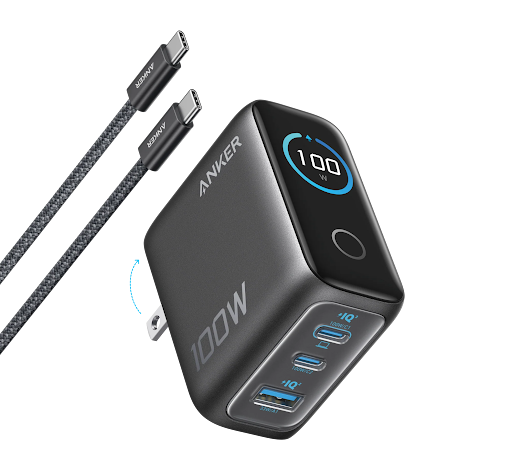
Modern life depends on devices that need to remain ready throughout the day. An iPhone may serve as a communication tool, camera, navigation system, digital wallet, and work assistant, while an iPad or MacBook supports studying, creative projects, and professional tasks. When these devices run low on power at different times, charging can quickly become an inconvenient part of an otherwise organised routine. Building a thoughtful charging setup in 2026 is therefore about more than finding a suitable adapter; it is about making everyday technology easier to manage.
Many users rely on separate cables and wall adapters for every device, creating unnecessary clutter around desks, bedside tables, and shared workspaces. Others carry several accessories whenever they leave home because they are unsure which devices will need power. A better approach starts with understanding which devices require wired charging, which support wireless charging, and whether a single accessory can handle multiple needs without compromising compatibility.
The right combination of iPhone chargers and multi-device charging accessories can help simplify this process. Rather than buying products solely because they promise higher output or have an attractive design, users can evaluate their everyday habits, available space, and device requirements to create a charging arrangement that works consistently at home, in the office, and while travelling.
Why Charging Habits Matter More Than Ever in 2026
The number of connected devices people use daily continues to influence how they organise their personal spaces. A typical Apple user might own an iPhone, Apple Watch, AirPods, and an iPad, with a MacBook added for work or study. Although these devices serve different purposes, they all need a reliable source of power.
Charging each item separately can create several small inconveniences. Cables may become tangled, wall outlets may fill up, and adapters can be misplaced when devices are moved between rooms. These issues are particularly noticeable in smaller apartments, shared bedrooms, university accommodation, and compact home offices.
A more organised approach begins by identifying the devices that are charged every day and the locations where charging usually happens. For example, someone who works from a desk may need a convenient arrangement for a phone, laptop, and earbuds. Someone who mainly charges devices overnight may prefer a dedicated bedside setup that keeps everything accessible without spreading cables across the room.
The objective is not necessarily to eliminate every cable. Instead, it is to reduce unnecessary connections, make charging more predictable, and ensure that each device receives power through a compatible accessory.
Selecting an iPhone Charger That Matches Your Needs
Choosing a charger requires more attention than simply checking whether its connector fits a phone. Charging speed depends on several factors, including the charger’s supported power output, the phone model, the cable, and the charging standard used by the devices.
A compact wall adapter can be suitable for everyday smartphone charging, especially for people who carry their phones throughout the day and prefer lightweight accessories. Users who also charge tablets or laptops may benefit from a higher-output adapter with multiple ports. This arrangement can reduce the number of individual adapters needed when travelling or working at a shared desk.
Before purchasing an adapter, check the maximum supported wattage and whether its ports share power when multiple devices are connected. A charger advertised with a high total output does not necessarily deliver that entire amount through one port. Likewise, connecting several devices may change how power is distributed between them.
Cable selection also matters. USB-C cables can differ in their supported power levels and data capabilities, so choosing a suitable cable helps avoid unnecessary charging limitations. For older iPhones with Lightning connectors, the appropriate cable must match the phone and adapter. Checking compatibility before buying can prevent the frustration of discovering that an otherwise suitable charger requires a different connection.
Understanding the Benefits of a Multi-Device Charging Station
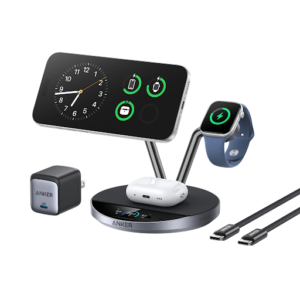
A multi-device charging station can make a substantial difference for households with several Apple products. Instead of using separate charging points throughout a room, users can create one central location for devices that need regular power.
An Apple charging station may combine several wired ports with wireless charging surfaces or dedicated positions for compatible devices. Depending on the design, a single station can support an iPhone, Apple Watch, and wireless earbuds, while some desktop charging stations focus on powering multiple phones, tablets, and laptops through USB connections.
The most appropriate design depends on which devices need to be charged together. A compact wireless stand may suit someone who primarily uses an iPhone and Apple Watch, whereas a multi-port desktop station may be more practical for a family or professional who regularly charges several devices at once.
It is important to examine the supported charging standards rather than assuming that every station offers identical features. Some wireless stations support magnetic alignment or Qi2 charging, while others use standard Qi wireless charging. Apple Watch charging also requires compatible hardware, and not every wireless charging pad can charge a watch.
A station should therefore be selected according to the exact devices it needs to support. When compatibility is confirmed in advance, centralising charging can make a desk or bedside table feel considerably less cluttered.
Creating a Dedicated Charging Area at Home
A designated charging area helps establish a consistent routine. Instead of charging devices wherever an outlet happens to be available, household members can return their accessories to one organised location.
A bedside table is a common choice because smartphones, watches, and earbuds often need charging overnight. However, the available space should influence the setup. A large desktop station may be unnecessarily bulky for a small bedside table, while a compact wireless stand may not provide enough connections for a household with several tablets and phones.
Home offices have different requirements. Users may need to keep a phone accessible during video calls, charge a laptop while working, and connect additional devices throughout the day. A station with sufficient port capacity can make these tasks easier without requiring several separate wall adapters.
Cable management can further improve the arrangement. Shorter cables, reusable cable ties, and a small organiser can prevent wires from crossing the desk or hanging behind furniture. Keeping chargers away from liquids and ensuring that ventilation is not blocked are also sensible precautions.
The charging area should remain convenient rather than becoming another complicated system to maintain. A simple arrangement that everyone can use consistently is often more effective than an elaborate setup with features that rarely serve a practical purpose.
Wireless Charging Versus Wired Charging
Wireless charging appeals to people who want to reduce repeated cable connections. A compatible phone can be placed on a suitable charging surface, making it easy to top up the battery between tasks. Magnetic alignment can provide additional convenience on supported devices by helping the phone remain correctly positioned.
However, wireless charging is not automatically the best option for every situation. Performance depends on the device, charger, alignment, and supported charging standard. Heat generation, protective cases, and foreign objects between the phone and charging surface can also affect the experience.
Wired charging remains useful when speed, efficiency, or broad compatibility is important. A suitable USB-C adapter and cable can support a range of devices, including phones, tablets, and laptops, provided the output meets each device’s requirements. Wired connections may also be preferable when users need to continue using a phone while it charges.
Many households benefit from combining both approaches. Wireless charging can serve as a convenient home or bedside option, while a compact wired adapter remains useful for travel, work, and situations where rapid charging is required. The goal is to choose the method that best suits each device and environment rather than treating wireless and wired charging as competing solutions.
Choosing Accessories for Travel and Daily Commuting
A charging setup that works well at home may be inconvenient when carried in a backpack. Travellers need to balance performance with portability, particularly when they already carry a laptop, headphones, and other personal belongings.
A compact charger with multiple suitable ports can reduce the number of adapters required for a trip. However, users should confirm the power requirements of their devices before relying on a single adapter. A phone and a laptop, for example, may require different amounts of power, and a charger may distribute its output differently when both are connected.
Foldable plugs, lightweight designs, and appropriately rated cables can make a travel kit easier to pack. For international travel, the wall adapter must also be compatible with the electrical outlets at the destination. A plug adapter may be necessary, although it does not automatically convert electrical voltage.
A small accessory pouch helps keep cables and adapters together. Before leaving, users can check that the charger is packed, the necessary cables are present, and the devices have sufficient power for the journey. This simple habit is particularly useful for business trips, where a missing charging accessory can disrupt an entire working day.
Safety and Long-Term Charger Maintenance
Reliable charging depends on both product quality and sensible usage. Users should select accessories that meet the relevant safety requirements and follow the manufacturer’s instructions for compatible devices, cables, and adapters.
Damaged cables, loose connectors, and batteries showing signs of swelling should never be ignored. If a charger or device becomes unusually hot, produces an unusual smell, or shows visible damage, disconnect it when safe to do so and stop using it until the issue has been assessed.
Heat management is particularly important. Charging devices under bedding, exposing them to direct sunlight, or leaving them inside a hot vehicle can create unfavourable conditions for battery performance. Wireless chargers should be placed on stable surfaces, and their ventilation requirements should be respected.
Users can also extend the useful life of their accessories by avoiding unnecessary bending of cables, storing equipment in a dry location, and keeping connectors free from dust and debris. Periodically checking cables and adapters makes it easier to identify problems before they interrupt an important task.
A charger should not be judged only by how quickly it charges a device on the first day. Compatibility, durability, safety features, and dependable everyday performance are equally important when evaluating long-term value.
How to Choose a Setup Without Spending More Than Necessary
Building a better charging arrangement does not require purchasing every available accessory. Start with the most frequent inconvenience. If the main problem is slow charging at a desk, a compatible adapter with suitable output may be sufficient. If several devices compete for a limited number of outlets, a multi-port charger or charging station could be a more effective investment.
Next, consider which devices genuinely benefit from wireless charging. A magnetic station can be convenient for compatible iPhones and supported accessories, but a user who primarily charges a laptop may receive more value from a high-output wired charger.
It is also worth checking existing equipment before buying replacements. A current USB-C cable or wall adapter may already support the necessary power requirements. Reusing compatible accessories can reduce expenses and prevent duplicate equipment from accumulating in drawers.
Finally, compare specifications, warranty information, and the manufacturer’s compatibility guidance. A well-chosen accessory should solve a specific problem, fit naturally into the user’s routine, and remain useful as their device collection changes.
Final Thoughts
An organised Apple charging setup in 2026 is built around convenience, compatibility, and the way devices are actually used. A suitable iPhone adapter can provide dependable everyday power, while a multi-device charging station can bring several essential accessories together in one location.
The best arrangement is not necessarily the largest or most powerful one. It is the setup that reduces clutter, supports the devices you own, and fits the spaces where charging happens most often. By comparing charging standards, checking power requirements, and investing only in accessories that address real needs, users can create a more efficient routine at home, at work, and while travelling.
Frequently Asked Questions
What should I look for when buying an iPhone charger in 2026?
Check the charger’s power output, supported charging standards, port type, cable compatibility, and safety information. Make sure the specifications match your iPhone model and any additional devices you intend to charge.
What is the main advantage of an Apple charging station?
A suitable charging station can centralise charging for multiple compatible devices, reduce cable clutter, and create a dedicated location for everyday accessories. Its exact capabilities depend on the model and supported charging standards.
Can one charger power an iPhone and a MacBook?
Some multi-port USB-C chargers can power both devices, provided they offer sufficient output and compatible connections. When several devices are connected, the charger may divide its available power between the ports.
Is wireless charging better than wired charging?
Neither method is universally better. Wireless charging can be convenient for everyday top-ups, while wired charging is often useful for efficiency, higher supported power, and broad device compatibility. The right choice depends on your equipment and habits.
Do all Apple charging stations support Apple Watch?
No. A station must include a compatible Apple Watch charging component to charge the watch. Check the product specifications carefully, especially when choosing a station designed for an iPhone and wireless earbuds.
How can I reduce cable clutter around my desk?
Use a dedicated charging area, choose a charger with the appropriate number of ports, and organise cables with reusable ties or a cable holder. Keep only the accessories you regularly need within easy reach.