


Internet access has become so familiar that people rarely think about the steps required to get a device online. A laptop connects to Wi-Fi, a phone opens a website, and a video begins playing. The process feels almost automatic until someone needs to work from a place without a broadband connection. This might happen during a road trip, at a temporary worksite, in a holiday cabin, or while spending a weekend outdoors. In these situations, a portable hotspot can provide another way to get online, provided a compatible mobile network is available.
A portable hotspot is a small device that creates a local wireless network and connects that network to the internet through a mobile data connection. Instead of relying on a fixed router connected to a broadband line, it uses cellular service to carry information between connected devices and online services. A laptop, tablet, or phone can then connect to the hotspot much as it would connect to Wi-Fi at home. The important distinction is that Wi-Fi describes the local wireless connection, while the cellular network provides the route to the wider internet. Keeping these two parts separate helps explain why a hotspot can show a strong Wi-Fi signal even when its internet connection is slow or unavailable.
For people planning outdoor activities, portable wifi for camping can be useful when they need to check maps, communicate with family, look up changing travel arrangements, or complete occasional online tasks. Its usefulness depends on the destination, however. A device cannot manufacture cellular coverage in a remote valley or behind a mountain where the relevant network does not reach. Battery life, data limits, weather exposure, and the number of connected devices also affect the experience. The best choice is therefore not necessarily the smallest device or the one with the most impressive advertised speed. It is the one that suits the conditions in which it will actually be used.
What Happens Inside a Portable Hotspot?
The process begins when the hotspot establishes a connection to a cellular network. Depending on the device and available service, that connection may use a supported 4G LTE or 5G network. The device contains a cellular modem and uses a SIM, eSIM, or another supported subscriber authentication arrangement to access mobile data. Once the network accepts the connection, the hotspot can send and receive internet traffic through the mobile provider.
Next, the device makes that connection available to nearby equipment over Wi-Fi. A laptop connects to the hotspot’s wireless network using its network name and password. When the laptop requests a webpage, the request travels over the local Wi-Fi connection to the hotspot, passes through the cellular connection to the internet, and reaches the relevant server. The response then returns along the route and appears on the laptop’s screen. The same basic process supports messaging, cloud applications, online documents, and many other everyday activities.
This arrangement is sometimes described as tethering, although the term can refer more broadly to sharing an internet connection from a phone or another device. A dedicated portable hotspot performs a similar role without requiring a smartphone to provide the connection. Some models are designed for simple personal use, while others support several devices at once or offer additional network-management features. The details vary by model, so advertised capabilities should be checked rather than assumed to apply to every portable hotspot.
Why Wi-Fi Signal Strength Does Not Tell the Whole Story
One common source of confusion is the difference between the hotspot’s Wi-Fi signal and its cellular reception. These are separate wireless links, and either one can become the weak point. A laptop might be sitting right beside the hotspot and receive an excellent Wi-Fi signal, yet pages may load slowly because the cellular connection is congested or weak. The opposite can happen too: the hotspot may have good mobile reception, but a connected device might be too far away or separated by walls that interfere with its Wi-Fi signal.
Cellular performance depends on several conditions. Distance from a mobile tower can matter, but it is not the only factor. Terrain, building materials, local network congestion, the supported frequency bands, and the capabilities of the device can all influence results. Even two nearby locations may perform differently if one is indoors and the other has a clearer path toward the network. This is why a coverage map is a useful starting point rather than a guarantee of service at an exact campsite or building.
The practical solution is to test the connection where it will be used. If possible, check reception at the intended location and try the tasks that matter most. Loading a simple webpage is useful, but it may not reveal whether a video call will remain stable or a large file will upload successfully. A brief test of the actual workload can expose limitations before they interrupt an important task.
Choosing a Hotspot for Camping and Other Outdoor Use
Camping introduces requirements that are easy to overlook when comparing devices at home. Access to electricity may be limited, the weather can change, and a suitable signal may be available only in part of the campsite. A hotspot with a large battery may reduce the need for frequent charging, but its real operating time will depend on the model, network conditions, connected devices, and how heavily it is used. A published battery estimate should not be treated as a guarantee for every trip.
Data consumption deserves similar attention. Sending messages and checking weather forecasts generally use much less data than streaming high-resolution video, downloading software updates, or backing up large photo collections. Several connected devices can increase consumption quickly, particularly when they perform automatic updates in the background. Before leaving, users can review their data allowance, disable unnecessary background activity, and download maps or entertainment for offline use where the relevant applications support it.
Device placement can make a difference as well. Keeping a hotspot inside a bag or enclosed vehicle may affect reception, depending on the surroundings and the device’s design. Moving it to a safe position with better reception may improve the connection, although it should remain protected from moisture, excessive heat, and physical damage. The manufacturer’s instructions should guide placement and operating conditions, especially when a device is not designed for direct exposure to the elements.
How Many Devices Can Connect at Once?
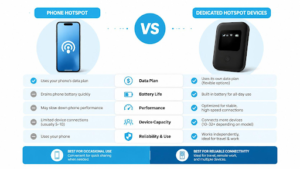
A portable hotspot can often share its connection with more than one device, but the maximum supported number is only part of the story. Every connected device uses the available cellular bandwidth when it sends or receives data. If one person is attending a video meeting while another uploads large files and a third streams a film, they may compete for the same limited connection. A hotspot that performs well with a single laptop may feel much slower under a heavier shared workload.Understanding how do portable hotspots work makes it easier to decide whether one is suitable for a particular journey or working arrangement.
The number of supported connections also does not automatically indicate how well the device will manage them. Performance depends on its hardware, Wi-Fi capabilities, cellular connection, and the demands of the connected devices. For a solo camper who mainly checks messages and maps, basic sharing may be enough. A family or small work team may need to consider simultaneous usage more carefully, particularly if several people expect to make video calls or transfer files at the same time.
It helps to decide in advance which activities are essential. If reliable communication is the priority, large downloads can be postponed until the connection is less busy. For work teams, automatic updates and cloud backups can be scheduled for later where appropriate. These simple decisions cannot increase the network’s underlying capacity, but they can help reserve the available connection for tasks that matter most.
Security Considerations When Using Public or Portable Internet
Creating a personal Wi-Fi network can offer more control than connecting directly to an unfamiliar public network, but it does not remove the need for sensible security practices. Users should set a strong, unique Wi-Fi password, change default administrative credentials where the device permits it, and install firmware updates provided by the manufacturer. They should also keep their laptops and phones updated, protect important accounts with multifactor authentication, and avoid sharing access details unnecessarily.
A hotspot also needs physical protection. Because it is a separate piece of equipment, it can be lost, forgotten, or taken while travelling. Anyone using a device for work should follow their organization’s rules for handling business information and reporting lost equipment. A company-managed VPN may be required for certain systems, but its use should follow the organization’s security guidance rather than being treated as a universal substitute for other protections.
Finally, users should understand what their mobile plan covers. Some plans impose data limits, restrict certain uses, or apply different charges when roaming internationally. A hotspot may connect successfully and still generate unexpected costs if the plan does not match the intended use. Reviewing the terms before a trip is much easier than trying to resolve a billing problem afterward.
What to Check Before Relying on One
Before purchasing or packing a portable hotspot, start with the destination. Check whether the intended mobile network offers coverage in the area and whether the device supports the network bands and service required there. If the location is particularly remote, consider whether there is a realistic alternative when cellular service is unavailable. No ordinary cellular hotspot can guarantee internet access in every environment.
Next, match the device to the expected workload. Occasional messaging and browsing place different demands on a connection than remote work, video conferencing, or large uploads. Compare the data plan, battery specifications, charging options, supported connections, and any restrictions that may affect use. If several people will share the hotspot, consider how their activities might overlap rather than relying only on the manufacturer’s maximum connection count.
It is also worth preparing for disconnection. Download essential information ahead of time, keep offline copies of important documents where appropriate, and make sure users know which applications can save work locally. These preparations are useful even when a hotspot is reliable because cellular service can fluctuate without warning. Having an alternative plan often matters more than achieving the highest possible speed under ideal conditions.
Final Thoughts
Portable hotspots work by combining two technologies: cellular connectivity for reaching the internet and Wi-Fi for sharing that connection with nearby devices. Once this distinction is clear, many common problems become easier to understand. A strong local wireless signal does not guarantee strong mobile reception, and a device that supports several connections cannot provide unlimited bandwidth or coverage where no compatible network exists.
For travellers, campers, and mobile workers, a hotspot can be a practical way to stay connected away from fixed broadband. Its success depends on realistic expectations, a suitable data plan, adequate power, and coverage at the destination. Checking these factors before relying on the device can prevent frustration and help users decide when a portable hotspot is the right tool—and when offline preparation or another form of connectivity would be more appropriate.
Frequently Asked Questions
Do portable hotspots need a home Wi-Fi connection?
No. A cellular portable hotspot uses a mobile data connection instead of depending on a home broadband router. It does, however, require compatible service and sufficient cellular coverage to access the internet.
Can a portable hotspot work where there is no mobile signal?
A standard cellular hotspot cannot provide a normal mobile internet connection if no compatible cellular network is available. Users travelling to remote areas should check coverage and prepare an alternative where internet access is essential.
Is a portable hotspot better than using a phone’s hotspot feature?
Neither option is always better. A phone can be convenient for occasional use, while a dedicated hotspot may be more suitable when several devices need regular access or when keeping connectivity separate from the phone is helpful. Battery life, data plans, coverage, and workload should guide the decision.
Does connecting more devices make the internet faster?
No. Connected devices share the available connection. If several devices use significant bandwidth at the same time, each may experience slower performance, especially when cellular reception or network capacity is limited.
Can portable hotspots be used for remote work?
Yes, where the mobile network, data plan, and device performance support the work involved. Users should test their essential applications in advance, follow security requirements, and prepare for interruptions if they will be working in areas with variable coverage.